
Jake's Resume: the look, without writing LaTeX
Jake's Resume is a free, one-page LaTeX resume template by Jake Gutierrez, popular with computer science students. To use the original, you edit its LaTeX source on Overleaf. If you only want the look, ResumeGood's default template is in the same style: answer a few questions, and download a PDF.
Building, editing and downloading are free. Downloading the PDF needs a free account.
What Jake's Resume is
Jake's Resume is a LaTeX resume template written by Jake Gutierrez and shared on GitHub and in the Overleaf template gallery under the MIT License. The source file says it is "Based off of" an older template, sb2nov/resume.
It became the default for many computer science students because it is plain in a good way:
- One column, one page, on US letter paper.
- Your name centred at the top in small capitals, with phone, email, LinkedIn and GitHub on one line, separated by bars.
- Section headings in small capitals with a rule underneath.
- Each entry on two lines: the school or employer in bold on the left with the place on the right, then the degree or job title in italics with the dates on the right.
- Four sections in the sample: Education, Experience, Projects, Technical Skills (grouped as Languages, Frameworks, Developer Tools, Libraries).
Nothing on it competes with your content.
Two ways to get the look
| The original on Overleaf | ResumeGood, in the same style | |
|---|---|---|
| What you edit | LaTeX source code | Plain form fields, one question at a time |
| What you need | Overleaf (an online LaTeX editor) or LaTeX installed | A browser, on a laptop or a phone |
| You get | A PDF and the .tex file | A PDF (a free account is needed to download it) |
| Change the layout | Anything, if you can write LaTeX | Pick another template or reorder sections |
| Best for | You want the exact template or the source file | You want the look and the PDF today |
The template itself is free under the MIT License. Neither option writes your resume for you.
How to use the original on Overleaf
- Open the Jake's Resume page in the Overleaf gallery and tap Open as Template.
- Replace the sample text inside the commands, for example
\resumeSubheading{Your University}{City, ST}{BS in Computer Science}{Aug. 2024 to May 2028}. - Delete the entries you do not need. Each school or job is one
\resumeSubheadingcommand followed by its bullet points (between\resumeItemListStartand\resumeItemListEnd); each project starts with\resumeProjectHeading. Delete the whole block, bullets included. - Recompile and download the PDF.
Watch for special characters: &, %, $ and # must be written as \&, \%, \$ and \#, or the file will not compile. That error trips up a lot of first-time users.
How to get the same style without LaTeX
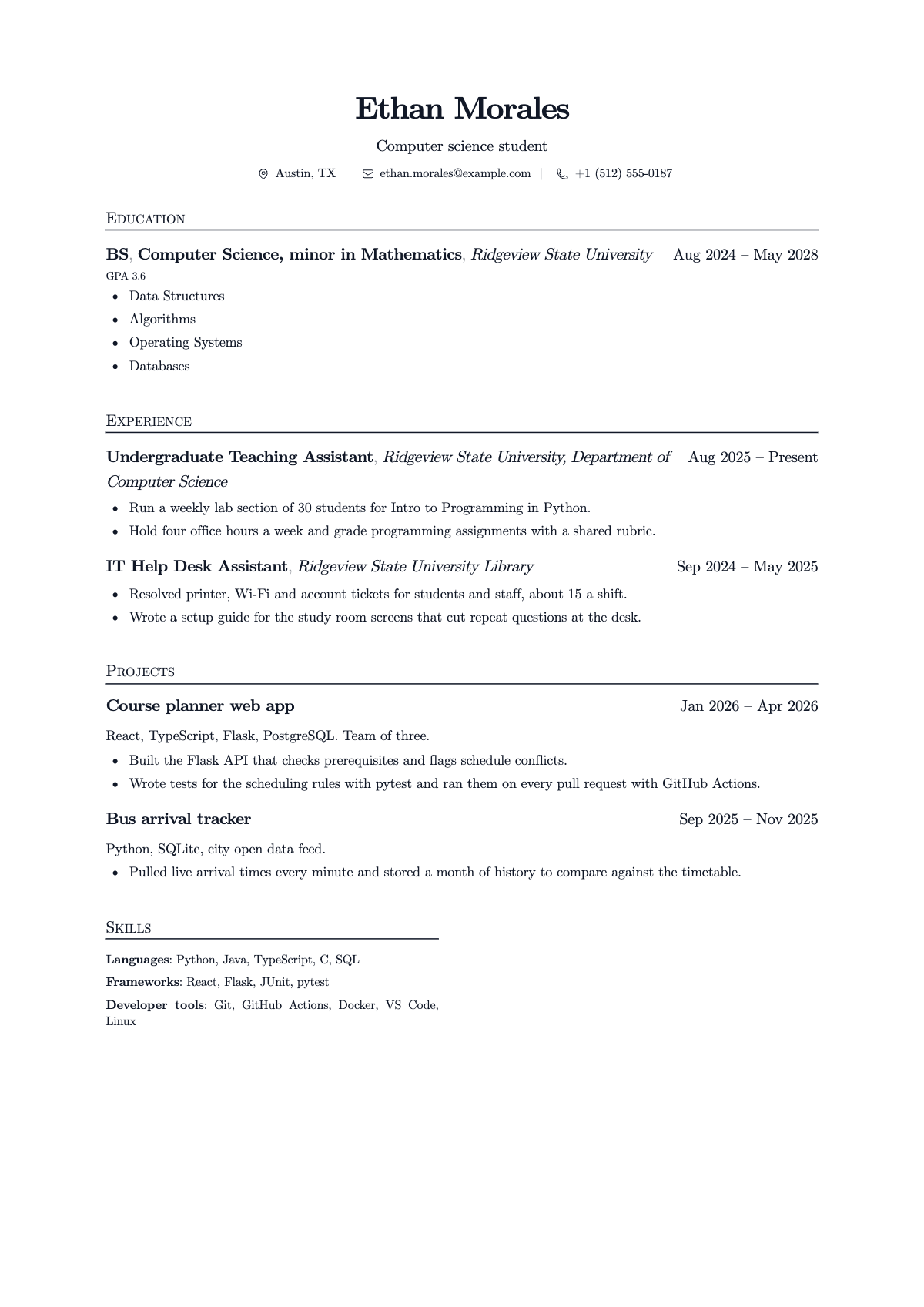
ResumeGood's default template, called LaTeX, is a single-column layout in the same style: centred name, contact details separated by bars, section headings in capitals with a rule underneath, and dates on the right. It is not the official template and not identical to it, but it reads the same way to a recruiter.
- Start the builder on this page. It asks seven short questions: your name and what you do, contact details, work, school, skills, what you are looking for, and the look.
- Answer them with your real content. If you already have a resume as a PDF, drop it in instead and it is read and laid out for you.
- On the last step, keep the LaTeX template (it is the default).
- In the editor, move Education to the top while you are a student, then Experience, Projects and Skills, as in the example above.
- Create a free account and download the PDF.
There is no .tex file and no Overleaf export. If you later need the source, you would retype it into the original template.
What to put in each section (CS students)
Education. School, degree, expected graduation month and year, GPA if it is 3.0 or higher, and four or five relevant courses (Data Structures, Algorithms, Operating Systems, Databases).
Experience. Internships first. Teaching assistant, help desk and research assistant roles all count, and so does any part-time job if you say what you were trusted with.
Projects. Two or three, each with the stack on one line and two bullet points: what you built and one concrete detail (what it handled, how you tested it, who used it). A class project is fine if you say what you did on the team.
Technical skills. Grouped, short, and only what you could be asked about in an interview. Four groups is plenty.
A strong project line:
When to use the original instead
Use Jake Gutierrez's template on Overleaf if you want the exact original, if you want the .tex file to keep in Git, or if you are comfortable in LaTeX and want to change the spacing yourself. It is a good template and it is free.
Use a builder in the same style if you want the look without the code, need to edit it from your phone, or just want to send the PDF tonight.
Questions
Who made Jake's Resume?
Jake Gutierrez. His LaTeX file credits sb2nov/resume as its starting point, and he released it under the MIT License, which lets anyone use and adapt it.
Is Jake's Resume ATS friendly?
Mostly, yes. It is one column of real text with plain headings, and the source turns on a setting so the PDF's text can be read by software. Keep it that way: do not add extra columns, graphics or icons.
Can I get Jake's Resume in Google Docs or Word?
The original is only LaTeX. Copies made by other people exist for Google Docs and Word, but they are not the author's. ResumeGood gives you a PDF in the same style; it does not export to Docs or Word.
Is this ResumeGood template the official Jake's Resume?
No. It is ResumeGood's own LaTeX-style template, in the same spirit: centred name, ruled section headings, dates on the right. It is not made or endorsed by Jake Gutierrez.
Can I download a .tex file from ResumeGood?
No. ResumeGood gives you a PDF, not LaTeX source. If you want the .tex file, use the original template on Overleaf or GitHub.
Sources
- Jake's Resume, LaTeX template by Jake Gutierrez (Overleaf gallery), October 2, 2026
- jakegut/resume, the template's source on GitHub (MIT License), October 2, 2026
- sb2nov/resume, the template Jake's Resume is based on, October 2, 2026
Start your resume
Building, editing and downloading are free. Downloading the PDF needs a free account.
Applying to a specific job? Jobician, from the same team, tailors your resume to the posting and drafts the cover letter. See Jobician